

- Telescopes
- Overview:
Telescopes - Achromatic Refractor
- Apochromatic Refractor
- Overview:
Apochromatic Refractor - ED Refractor - less color aberration than an achromatic
- SD APO - color free 2-element APO objective
- EDT APO - 3 element ED objective
- High End APO with 3-element APO objective - no color aberation
- Flatfield APO with flat field for Astrophotography
- All Apos and EDs from all manufacturers - large overview
- TS APO and ED from Japan with high quality optics
- Overview:
- Newtonian Telescopes
- Dobsonian Telescopes
- RC Ritchey Chretien Telescopes
- Casssegrain Telescopes
- Reflektor Telescopce with Lens Correcture
- Maksutov Cassegrain Telescopes
- GoTo Telescopes
- Smart Telescopes
- Solar Telescopes H-Alpha
- Overview:
- Mounts Tripods Rings Rails Power Supply ...
- Overview:
Mounts Tripods Rings Rails Power Supply ... - Mounts Equatorial with GoTo
- Mounts Equatorial without GoTo
- Mounts Azimutal with GoTo
- Mounts Azimutal without GoTo
- Mounts GoTo - Harmonic Drive
- Travel mounts for astro imaging
- Tripods Piers Polar Wedges
- Mount Control & Electronics
- Dovetail Clamps, Plates and Mount Adapters
- Tube Rings
- Power Supply
- Counterweights Balance Weights
- Mount Accessories - Other
- Overview:
- Telescope Accessories
- Overview:
Telescope Accessories - Eyepieces
- Barlows & Reducer Lenses
- Diagonal Mirrors and Prisms
- Binocular Viewers
- Finder Scopes
- Telescope Collimation and Test
- Cleaning Tools
- Transport and Storage
- Dust protection for Telescopes & Accessories
- Stray Light Protection
- Dewcaps and Heater
- Focusers, Adapters, Motorfocus
- Telescope DIY & Improvement
- Other telescope accessories
- Replacement Parts
- Overview:
- Filters
- Overview:
Filters - Color Filters and Color Filtersets
- Nebular Filters for Visual Observing
- Neutral-Density and Polfilter
- Photo Narrowband Nebular Filters
- Photo Broadband Filters
- Photo Planetary Filters
- Photo R-G-B and IR Cut Filters
- Photo - Filtersets
- Photometric Filters
- Clip Filter for DSLR Cameras
- Filter Wheels and Filterslider
- Solar Filters for white light
- Solarfilter for H-Alpha and Calcium
- Overview:
- Adaptors
- Overview:
Adaptors - Adapter 1,25" and 24,5mm
- Adapter 2"
- Adapter T2 - M42x0.75
- Adapter M48x0,75
- Adapter M54
- Adapter SC
- Adapter M63
- Adapter M68
- Adapter to other Threads
- Adapter Extensions
- Adapter camera bayonet
- Adapter Objective Filterthread
- Adapter Quick Changing , Rotation
- Adapter Eyepiece Projection
- Adapters Tilting
- Overview:
- Astrophotography and Photography
- Overview:
Astrophotography and Photography - Cooled Cameras
- Cameras without Cooling
- Deep-Sky Cameras uncooled
- Set-Offers Camera, Filter, Wheels
- Acessories for Cameras
- Travel mounts for astro imaging
- Imaging Correctors for Telescopes
- Autoguiding Cameras & Sets
- Everything for Guiding
- Focusing aids - Bahtinov mascs
- Flat Field foils and boxes
- Lenses for Cameras
- Piggyback Camera Holder
- Camera Bags, Photocases & more
- Digital Camera and Smartphone Adapter
- Other photo accessories
- Overview:
- Binoculars, Spotting Scopes, Microscopes, Range Finders
- Overview:
Binoculars, Spotting Scopes, Microscopes, Range Finders - Spotting Scopes and Acessories
- Roof Prism Binoculars
- Binoculars with Porro prisms
- Binoculars from 100mm Aperture
- Binoculars with 1,25 inch eyepieces
- TSMX APO Binoculars
- Binoculars for Astronomy
- Binoculars Hiking Bird watching
- Monoculars - Opera Binoculars
- Accessories for Binoculars
- Range Finders
- Microscopy
- Bags for Phototripods & Binoculars
- Overview:
- Phototripods and Binomounts
- Books, Software
- Overview:
Books, Software - Books for Astronomy Beginners
- Star Charts and Planispheres
- Books about our Solar System
- Observing Tips for Amateurs
- Popular Astronomy Literature
- Teaching material
- Astrophotography books
- Telescopes, Observatories, Construction
- Calendars Yearbooks
- Software, Star Charts
- Books for Microscopers
- Books Nature and Animals
- Nature Photography TimeLapse
- Overview:
- Night Vision, Magnifiers, Weather, Domes & more
- Beginner Astronomy and Gift Ideas
- Second Hand & Special Offers
- New products

manufacturers


Manufacturer: WandererAstro
Product number: WMFP4-190
EUR449.00new
EUR 449,00
incl. 19 % VAT (DE)
The VAT indicated refers to that applicable in Germany. After logging in, the VAT amount is adjusted to the applicable VAT of the stored delivery country. Therefore, the final price may vary accordingly.
excl. 7.95 € shipping costs (DE)
more details to the shipping costs ...Please log in to calculate shipping costs to your country.

There are no reviews for this product


- Details..
- Technical data..
- In the box..
- Reviews..
- Manufacturer infos..
- Safety informations..
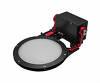
Wanderer Astro Motorized Flat Panel V4, 190 mm
The Wanderer Cover V4 is a motorized system with an integrated flat box closure cap, designed specifically for remote observatories or for astronomers who want to fully automate their setup, even while traveling!Technical Features
The Wanderer Cover comes complete for immediate installation as it includes a functioning 12 V stepper motor. The opening of the Wanderer Cover can be customized to different positions, providing a maximum 270° opening. This option allows you to reduce wind resistance when the panel is closed.
A mechanical limit will prevent excessive opening, forcing the closure to a user-defined position in such cases.
The V4 version includes an integrated 3-level heating system!
The Wanderer Cover also features an LED panel with 255 levels of customizable intensity, replicable using third-party software (NINA, SGP, Voyager) or the native Wanderer software.
USB interface for complete control with PC or laptop
The Wanderer Cover V4 can be completely controlled remotely. In particular, you can:
Download page for the control software
| Light source: | LED system with light diffuser |
| Brightness levels: | 255 |
| Usable diameter (for flats): | 190 mm |
| Outer diameter of the cover: | 215 mm |
| Position encoder for cover: | yes |
| Position angle of the cover: | up to 270° |
| Repeatable positioning accuracy: | +/- 0.25° |
| Mechanical stop for cover: | yes |
| ASCOM compatible: | yes |
| Computer connection: | USB 2.0 type B (max 500 mA) |
| Built-in heating elements: | yes, 3 levels (max. 9 W) and "off" selectable |
| Power connection: | 12 V, 2 A, 5.5/2.1 mm coaxial power connector (DC connector) |
| Power indicator light: | yes |
| Material: | Carbon fiber and aluminum |
| Weight: | 448 g |
How do I get a good flat field image?
A good flat compensates for edge shading (vignetting), but also for darkening caused by dust on the filter, sensor or corrector. The background becomes even, the contrast can be raised further to make finer details visible in faint nebulae. The following basic settings should be noted:How do I find the right exposure time with the shooting software, for example Maxim DL?
The ADU value (Analog Digital Units) helps here. Every capture program shows this value when you move the mouse over the image. In the center of the image, where the illumination is highest, the ADU value is highest. The longer you expose, the higher this value becomes. If the ADU value is higher than the maximum value of the camera, the image is overexposed. A camera with 16 bits has a max. ADU value of 65536, one with 14 bits has 16384, one with 12 bits only 4096.
The exposure time of the flat should be so short that in the middle of the flat the ADU value is at most 50% of the maximum value of the camera. Then the flat looks well exposed. We recommend to take at least 10 flats per exposure and to process them to a "master flat".
If the flatfield box is too bright, that means it always produces overexposed images, then a white paper, which is fixed in the flatfield box, helps. This will dim the light and allow for slightly longer exposure times.
| Manufacturer / Importeur: | Artesky Srl |
| Street: | Via IV Novembre 103 |
| ZIP / City: | 20833 Giussano (MB) |
| Country: | Italy |
| Telefon number: | +39 362 310657 |
| Email: | info@artesky.it |
| Website: | artesky.it |
Safety informations: PDF Download
Recommended accessories
Cleaning & Collimating
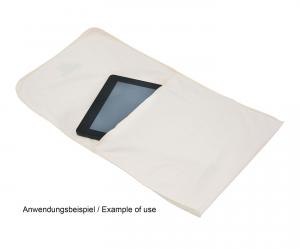
TS-Optics Optical Soft Microfibre Cleaning Cloth and Bag, 26x24 cm
EUR 7,50RRP EUR 11,95you save 37.2% (EUR 4,45)
General Accessories

Power Supply
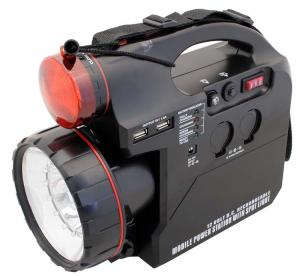
Omegon Power Tank with 7 Ah - 12 V power supply for telescopes

- Only 2 pcs left in stock
EUR 119,00RRP EUR 149,00you save 20.1% (EUR 30,00)

Similar Products
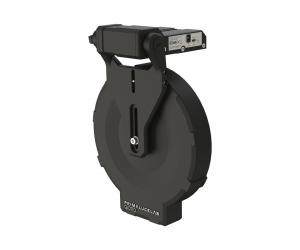

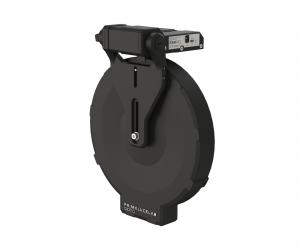



Wanderer Astro motorized LED Flatfield Panel, 190 mm - IR remote control included
- Only 1 pcs left in stock
EUR 479,00

Reviews
